




Motor Switch
Control your motor from anywhere.
GSM-based smart motor controllers that let you monitor, schedule, and protect your motor remotely - via app or phone call.

Smart Motor Controllers
GSM-based controllers for remote motor management - from basic app control to battery-backed 4G automation.
Mobile Auto Switch 2G


Key Features
- Motor control and Status Monitor using App & call.
- Responds on voice call via IVRS - works with keypad phones too.
- Protection against Dry Run (without water).
- Phase fault protection - absent phase, voltage imbalance, phase reverse.
- Schedulable ON/OFF timer with repetition mode.
- Supports up to 40 HP - works on 1, 2 & 3 phase.
- Protection against overload. Compatible with DOL, Semi & Fully Automatic.
- Up to 6 users can operate the device from anywhere in the world.
- Callback/SMS on manual start, any fault, or power on.
- Works with any SIM (except Jio).
Mobile Auto Switch 3G with Battery


Key Features
- Motor control and Status Monitor using App & call.
- Auto mode, timer, and scheduler work even when power goes out.
- 48-hour battery backup - works on 1, 2 & 3 phase.
- Tracks daily motor run-hours for usage insights.
- Timer settings for low and high voltage conditions.
- Phase fault protection - absent phase, voltage unbalance, phase reverse.
- Up to 6 users can operate the device from anywhere in the world.
- Overload and dry run protection - supports up to 40 HP.
- Callback/SMS on manual start, any fault, or power on.
- Works with any SIM (except Jio).
Mobile Auto Switch 4G


Key Features
- Motor control and Status Monitor using App & call.
- Responds on voice call via IVRS - works with keypad phones too.
- Protection against Dry Run (without water).
- Phase fault protection - absent phase, voltage imbalance, phase reverse.
- Schedulable ON/OFF timer with repetition mode.
- Supports up to 40 HP - works on 1, 2 & 3 phase.
- Protection against overload. Compatible with DOL, Semi & Fully Automatic.
- Up to 6 users can operate the device from anywhere in the world.
- Callback/SMS on manual start, any fault, or power on.
- Works with all SIMs including Jio.
How It Works
Mobile Auto Switch is a GSM technology-based motor controller that communicates with the farmer's mobile phone, eliminating the need to physically operate the motor. It can be controlled via Android app or IVRS voice call, provides protection against phase failure, phase reverse, overload, and dry run - alerting the user by call or SMS on any fault condition. Motor schedules can be set by time for fully automatic operation.
TTMA3R3P Mobile Auto Switch
Complete installation, operation, and configuration guide
Device Overview
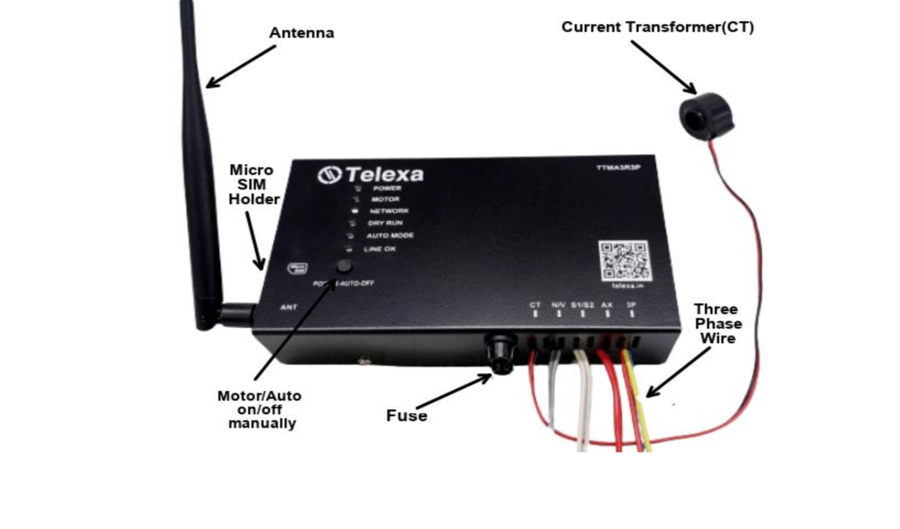
Front View - Labeled
Side View
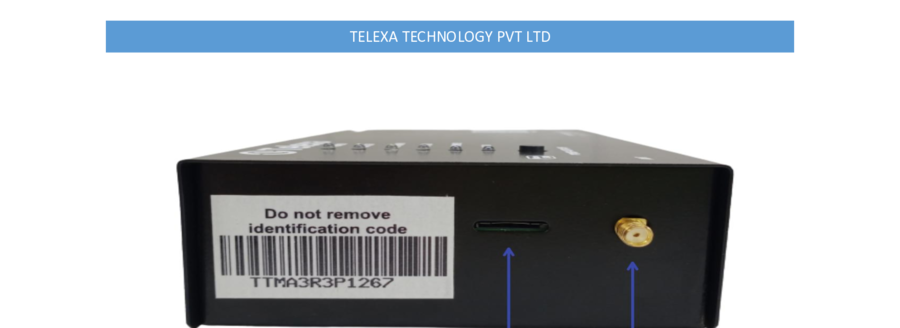
Micro SIM Holder
Antenna Connector
Control Panel
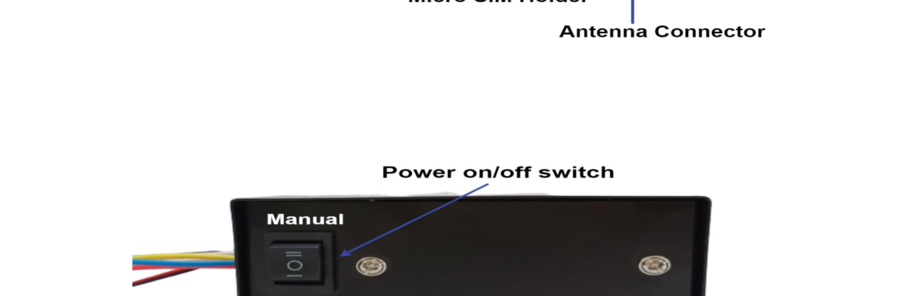
Power On/Off Switch
Manual / Auto toggle
Base View
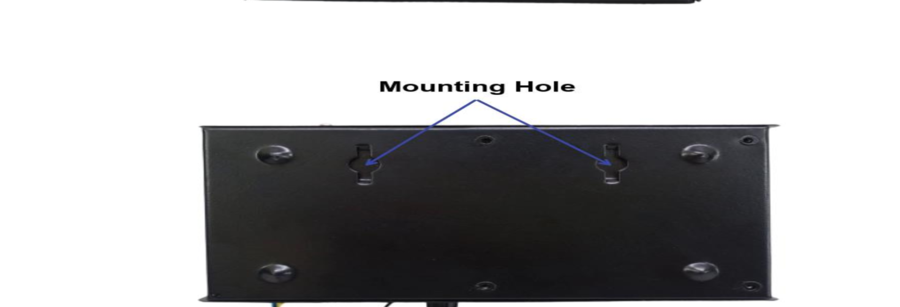
Mounting Holes
For DIN-rail or panel mounting
Device Unboxing
Box Contents
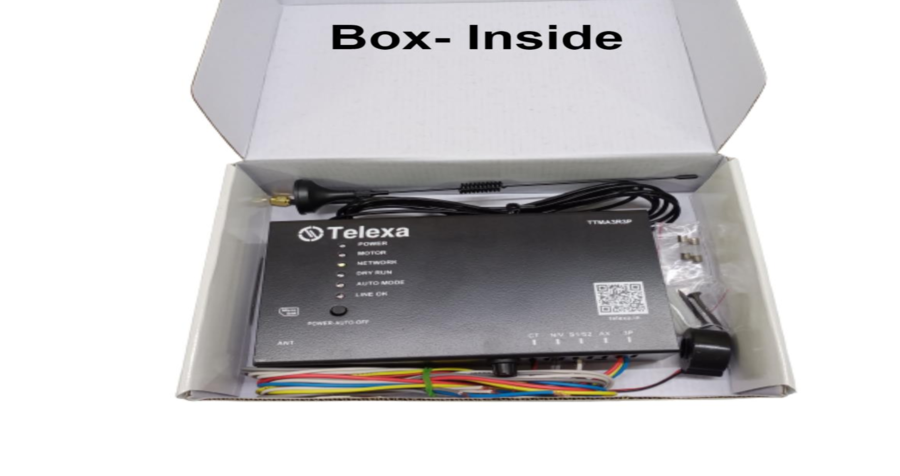
- 1TTMA3R3P - GSM Motor Controller
- 2Antenna
- 3User Manual
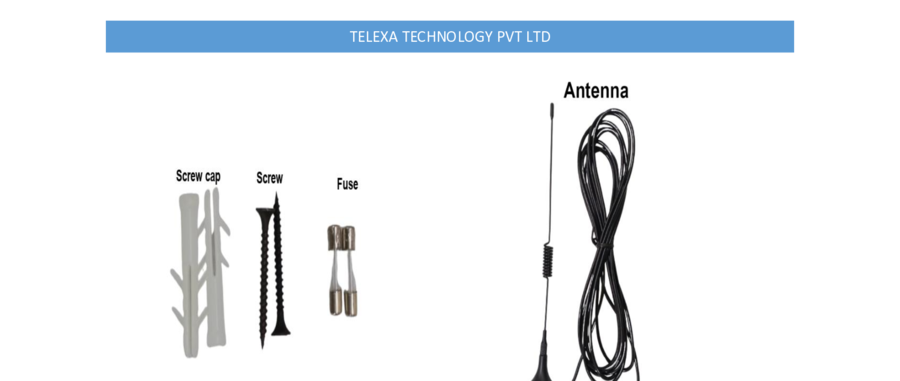
- 42 Screws + 2 Screw Caps (7.5×30mm)
- 52 Extra Fuses
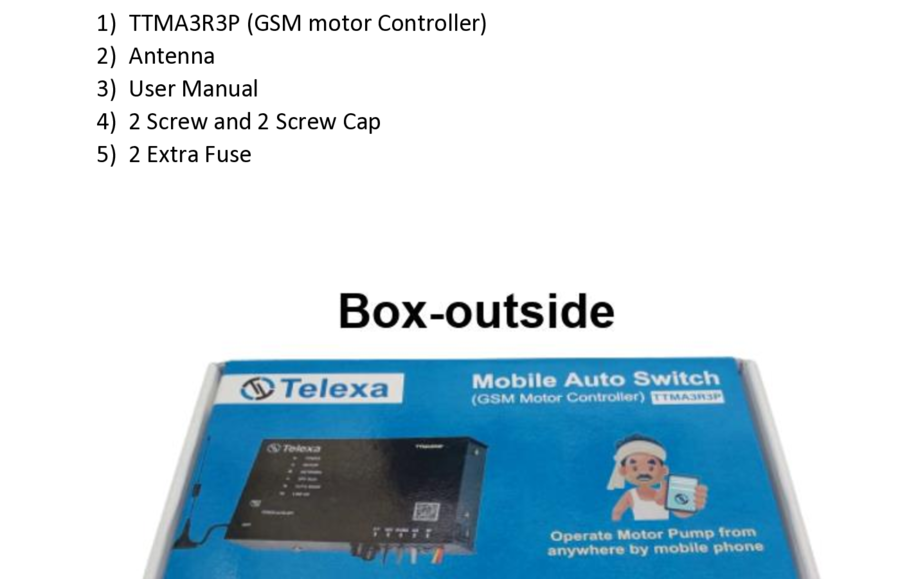
Box - Outside
Box - Inside & Components
Installation
Install device in a dry place. Protect from direct dust, water, and sunlight.
Mount device with your motor starter using the two included screws (7.5×30mm). Ensure the device does not touch the ground.
Insert a Micro SIM in the left-side SIM card holder. Push gently until it locks. To remove, push again and slide out.
Connect the antenna to the left-side antenna connector. Place the antenna where it can get maximum signal strength.
Ensure the SIM card has valid balance, network coverage, and SMS balance at the installation site.
Electrical Connection
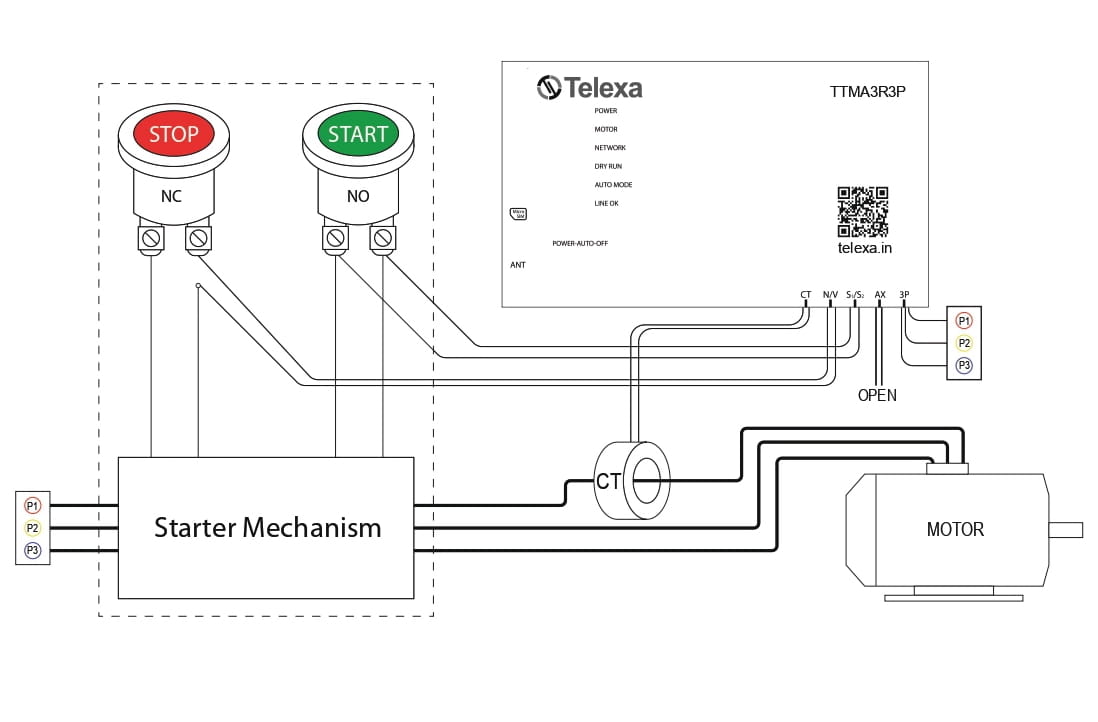
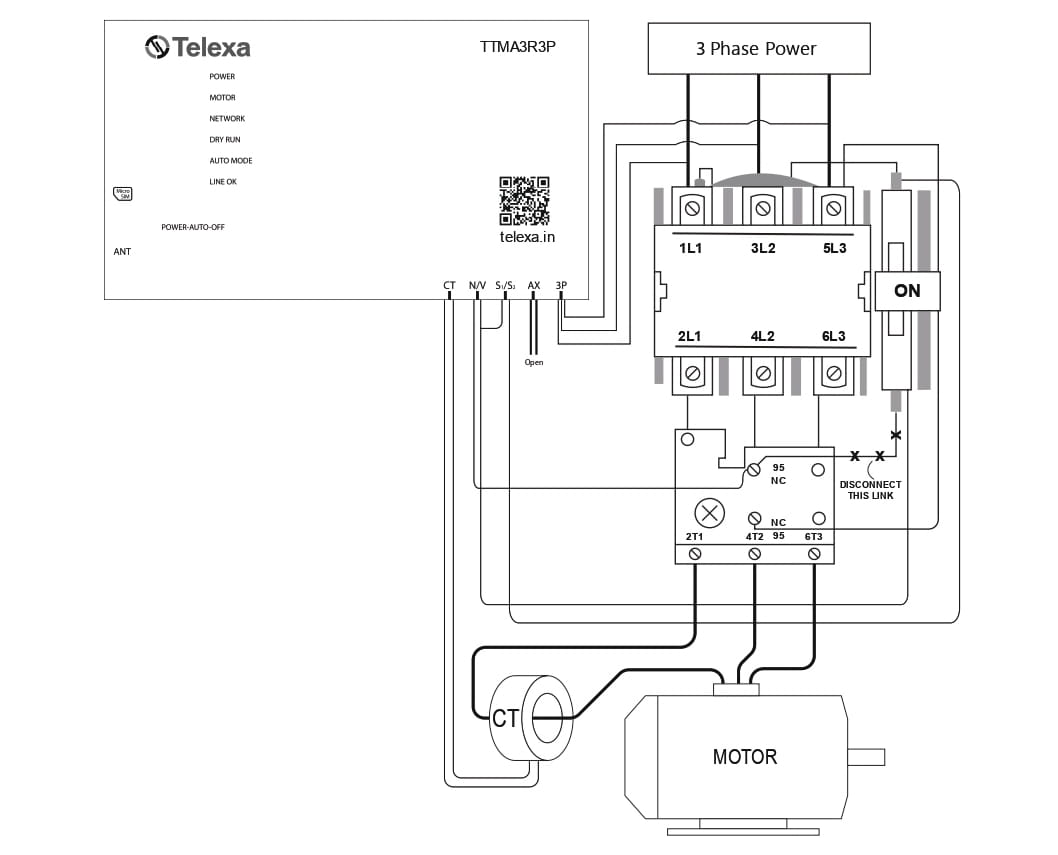
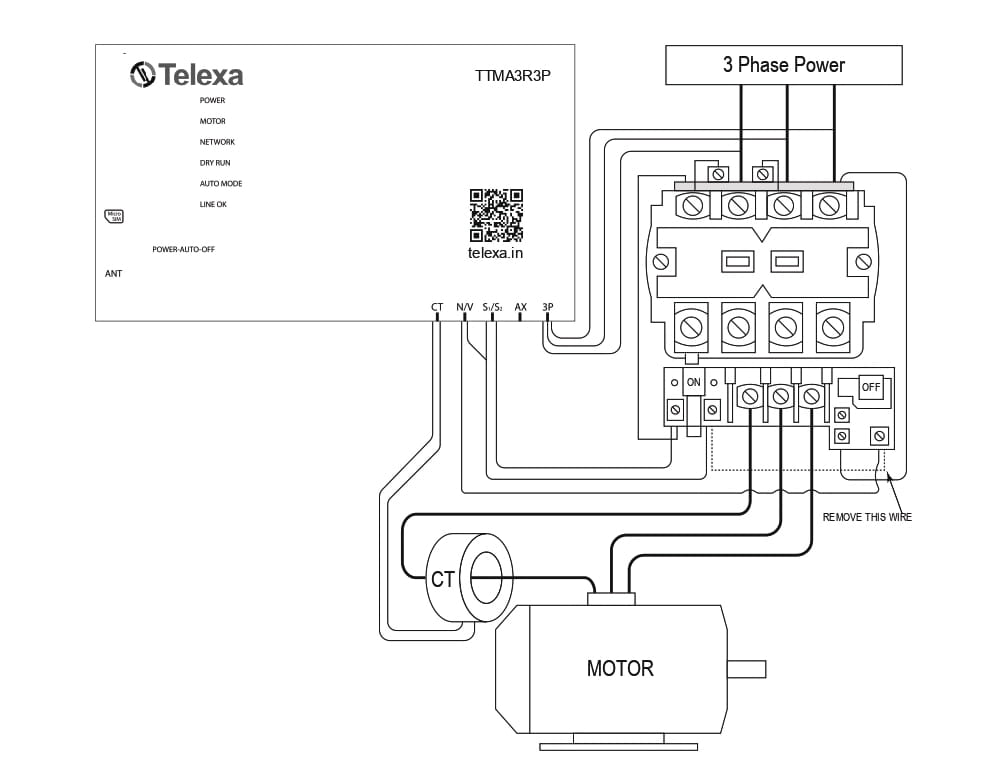
Works with single phase, two phase, and three phase. Compatible with all starter types: DOL, Star Delta, and Panel starters.
Common Wire Connection (All Starter Types)
7 wires for 3-phase or 9 wires for single-phase come with the controller.
Connect 3P (3 wires) to R, Y and B input terminals of your DOL/Star Delta starter.
Connect white wire S1/S2 to the starter right side, across the push button.
Connect gray wire N/V to the starter bottom-right and top-left side.
Current Transformer (CT) - pass one main motor phase cable through CT to sense current.
3-Phase Wiring Diagram
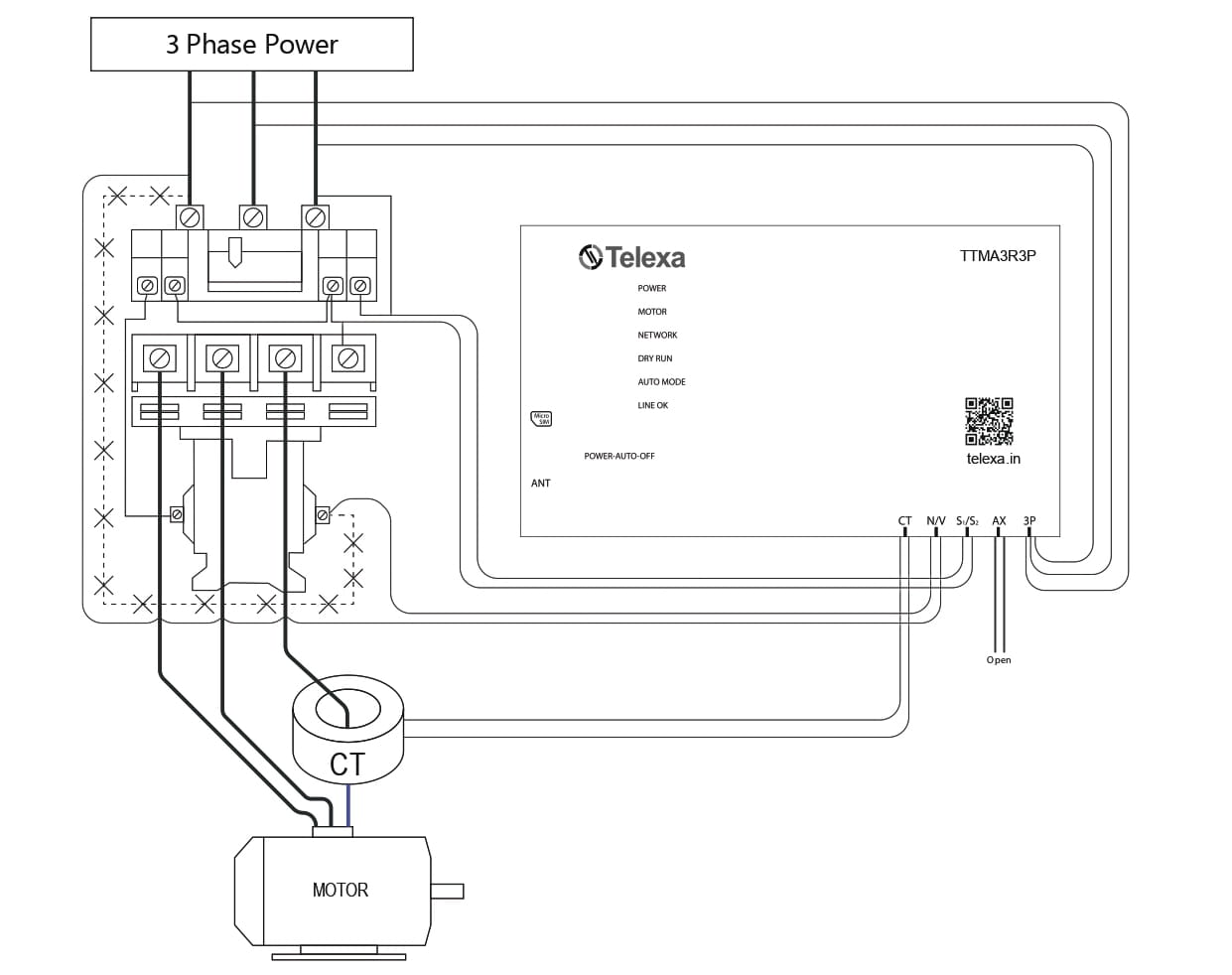
Starter Mechanism Wiring
SMS Command Reference
Once the SIM has network, operate the device via Call (IVR), SMS, or the DD Zone App. Save up to 6 mobile numbers: send #MNO*0*YourNumber(no 0 or +91 prefix).
| # | Command | Description |
|---|---|---|
| 1 | #MNO*0*9583556225 | Save mobile number. Do not prefix with 0 or +91. |
| 2 | #MOTOR*1* | Motor ON |
| 3 | #MOTOR*0* | Motor OFF |
| 4 | #STATUS* | Get current motor and phase status. |
| 5 | #AUTO*1*#AUTO*0* | Auto mode ON / OFF. Motor starts automatically when power is restored. |
| 6 | #SCH*0*1235*12501 | Save schedule in 24h format. Start time < end time. Last digit = active (1) or deactivated (0). |
| 7 | #DRY*1*#DRY*0* | Dry run protection ON / OFF. |
| 8 | #SCHSTATUS* | Get saved schedules and their status. |
| 9 | #INFO* | Get saved user list. |
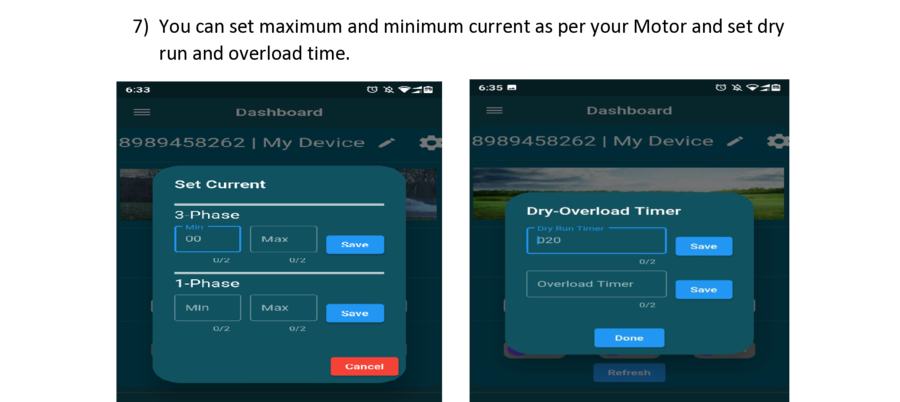
| 10 | #LOAD*04*07* | Set min/max current for dry run (3-phase). Both digits must be 2 characters. |
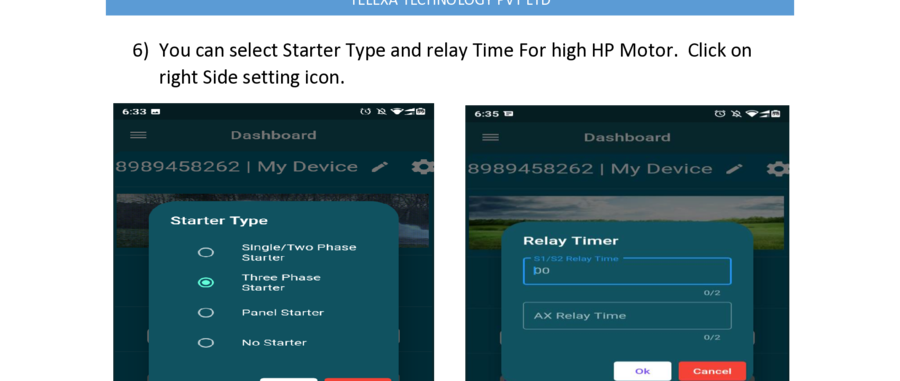
| 11 | #STARTER*type* | Save starter type: 0 = 3-phase, 1 = single/2-phase, 2 = no starter, 3 = panel starter. |
| 12 | #TIME*01*03* | Set relay switching time (2 digits). Relay1 = semi-auto 3-phase; Relay2 = start capacitor / star-delta. |
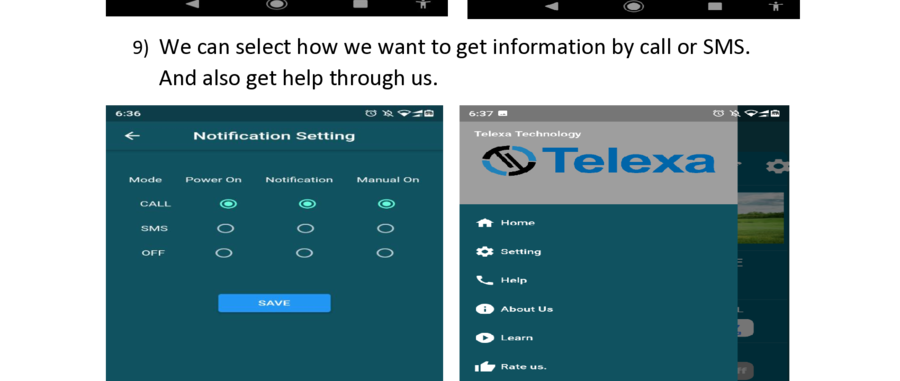
| 13 | #CALL_SMS*0*#CALL_SMS*1*#CALL_SMS*2* | Alert mode: Call / SMS / Disabled. |
| 14 | #LOCK*0*#LOCK*1* | Lock enabled / disabled. Prevents unauthorized control of the device. |
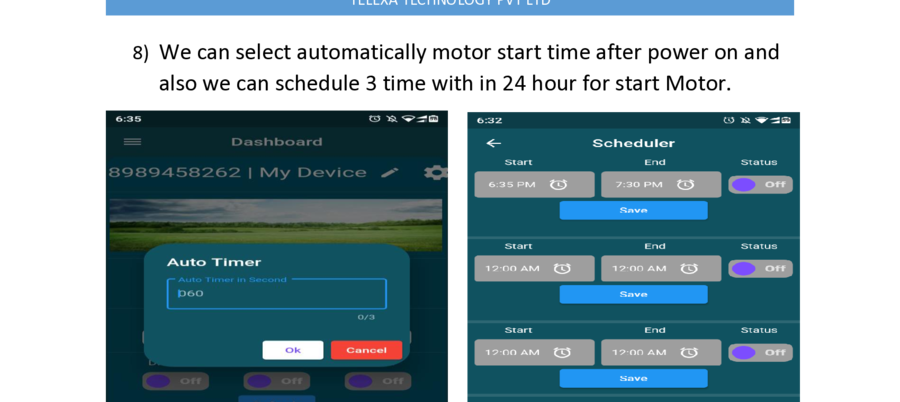
| 15 | #ATIMER*009* | Auto timer - time delay between phase OK and motor auto-run (3-digit seconds). |
| 16 | #RESET* | Reset device to factory settings. |
| 17 | #2PLOAD*min*max* | Set current for dry run in 2-phase condition. |
Operation Modes
Auto Mode
In auto mode, the motor starts automatically when power is restored. You can still start and stop manually via mobile.
#AUTO*1*Enable via SMS#AUTO*0*Disable via SMSManual Mode
Control the motor at any time via call, SMS, app, or the physical button on the device.
#MOTOR*1*Motor ON via SMS#MOTOR*0*Motor OFF via SMSProtection Settings
Dry Run Protection
Motor turns off automatically if no water is being drawn (no load current detected).
#DRY*1*to enableOverload Protection
Motor turns off when current consumption exceeds the set maximum threshold.
#LOAD*04*07*Device Lock
Prevent unauthorized users from controlling the device remotely.
#LOCK*0*lock#LOCK*1* unlockIVR - Operate by Call
Call the device SIM number. When connected, use your keypad to issue commands via the IVR menu.
DD Zone App
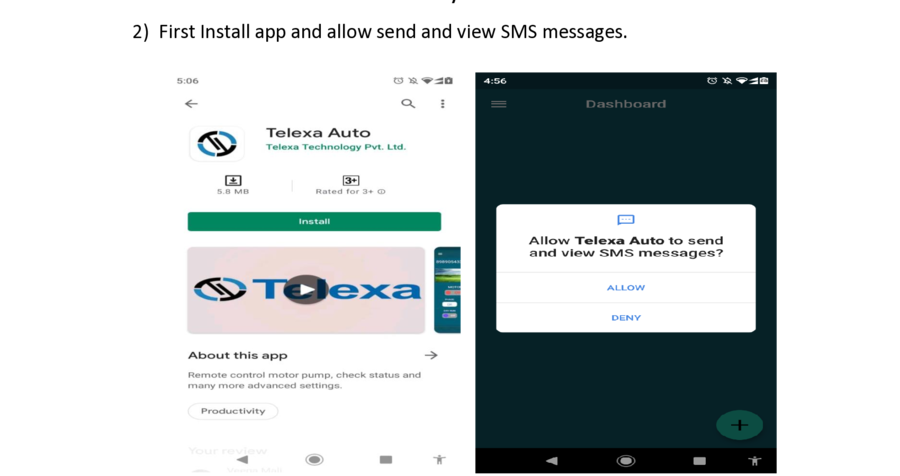
Download & Setup
Download DD Zone App from Apple App Store or Google Play Store.
Install and allow SMS send/view permissions when prompted.
Tap + to add device. Enter the device SIM number and a field name.
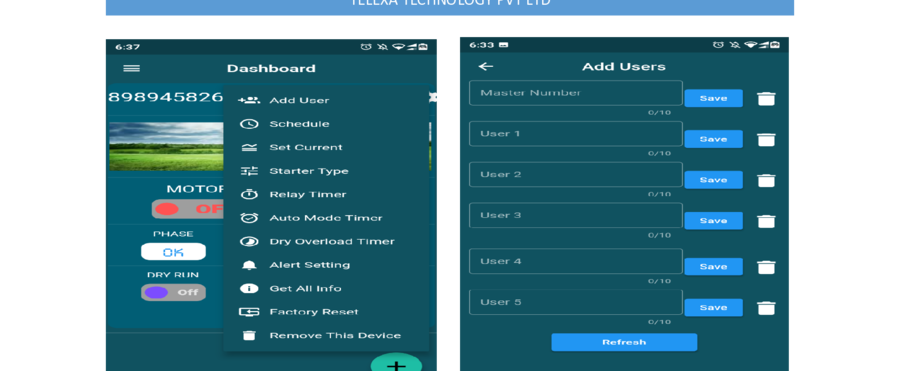
Open settings → Add Users. Enter Master No. and up to 5 additional numbers.
Install
Add Device
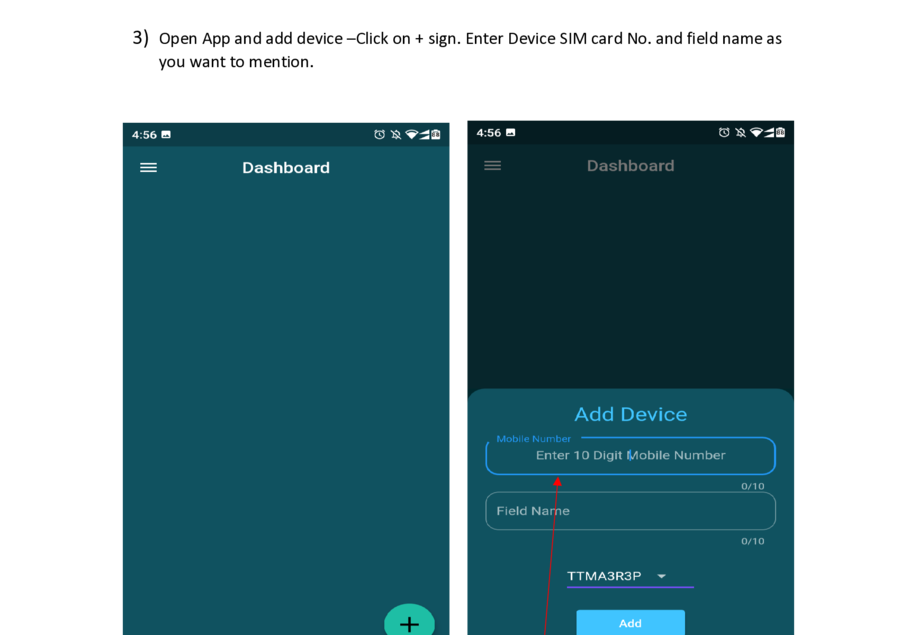
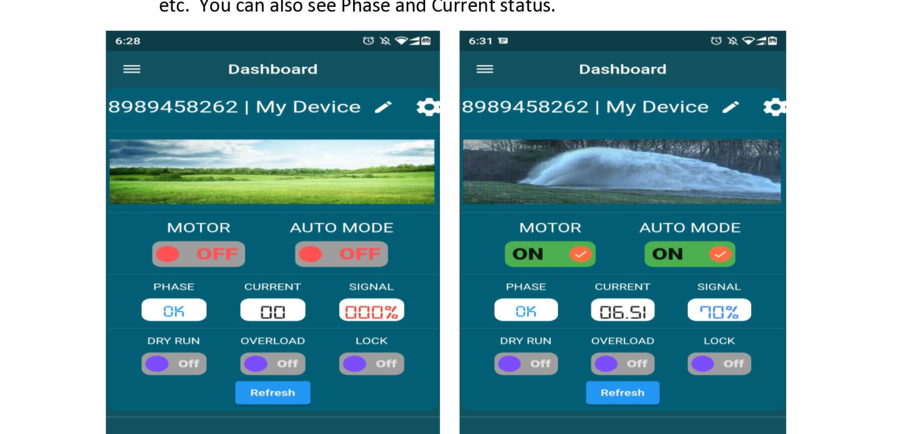
Dashboard
Add Users
Starter Type
Set Current
Scheduler
Notifications
What You Can Do from the App
Technical Specifications
| Sr. | Specification | Parameter |
|---|---|---|
| 1 | Protection Design | Microcontroller-based current sensing |
| 2 | Supply Voltage | 240VAC – 440VAC ±5%, 50Hz |
| 3 | Output Relay Contact S1 | 1-CO 7A / 240VAC |
| 4 | Output Relay Contact S2 | 1-CO 7A / 240VAC |
| 5 | Output Relay Contact S3 | 1-CO 20A / 240VAC |
| 6 | GSM Network | SIM (2G, 3G) |
| 7 | Interactive Voice Response (IVR) | Yes - language as per customer choice |
| 8 | Users Registered | Up to 6 |
| 9 | Pump Current Setting Scale | 2A – 100A via CT |
| 10 | Protection Settings | Input phase failure / reverse phase / voltage & current unbalance Overload range: 30%–100% | Default: 20% of set current Dry run range: Off 30%–100% | Default: 20% of set current |
| 11 | Timers | Power on: 3s–300s (default 60s ±3s) Star-delta: 3s–30s (default 10s ±2s) Dry run: 3s–30s (default 20s ±3s) Overload: 3s–30s (default 10s ±2s) 3 schedule timers within 24 hours |